How the TUI works
A walkthrough of the drevops/tui engine - what you assemble to build a form, and
what happens when it runs. The diagrams are rendered from the PlantUML sources in
docs/architecture/;
everything below is derived from src/, so if the prose and the code disagree,
the code wins.
The shape of it
At the centre is the Engine. Everything else is either something you hand it (a
configuration, a set of handlers, a theme) or something it produces (validated
answers, a JSON schema). The packages below mirror the src/ subdirectories, and
the arrows are the main dependencies.
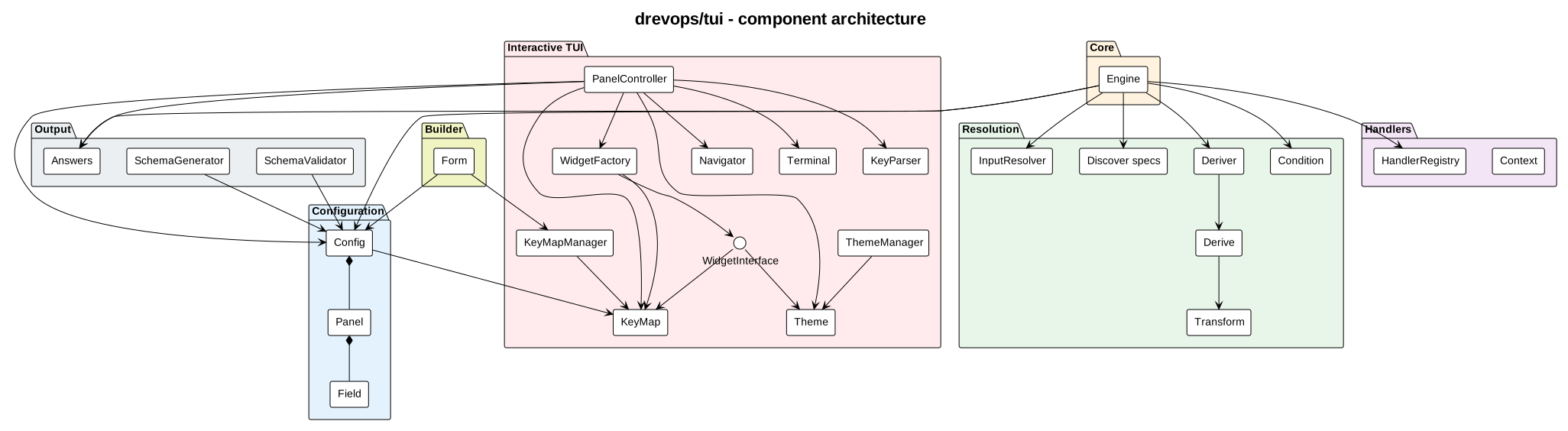
Read it in three bands:
- Left - what you provide. A Config (assembled by the fluent
Formbuilder intoConfig->Panel->Field) and, optionally, Handlers (classes that carry behaviour). Together these declare the questions and how each one behaves. - Middle - the Engine and its helpers. The Engine drives collection, leaning on
InputResolver(read a payload),Discovery(detect from the directory),Deriver+Transform(compute values), andConditionEvaluator(decide what is shown). - Right - what comes out, and how it is shown.
Answers(plus aSchemaGenerator/SchemaValidatorfor agents and forms), and the interactive TUI -PanelControllercomposing aTheme(resolved by name throughThemeManager), aKeyMap(resolved by preset throughKeyMapManager), widgets, aNavigatorand aTerminal.
Step 1 - describe the questions
You declare the questions in PHP with the fluent Form builder: panels holding
fields. A field has an id, a type (text, select, multiselect, suggest,
confirm) and optional rules - default, required, options, when (show it
only when a condition holds), derive (compute it from other fields) and
discover (detect it from the target directory). The builder validates the
declaration - rejecting duplicate field ids - and builds the immutable Config
model. Nothing runs yet; this is pure description.
Step 2 - attach behaviour where you need it
Most fields need no code. When one does - a dynamic default, discovery, validation
or a normalisation - declare it on the field itself: ->default(fn ...),
->validate(fn ...), ->transform(fn ...), ->discover(...). Reusable
validators and transformers are public static methods on a consumer class named
after the field id (machine_name -> MachineName) in a registered namespace -
referenced explicitly as first-class callables or discovered by the engine as the
fallback; the field declaration wins when both exist.
Step 3 - collect the answers
Engine::collect() turns the config plus whatever the caller supplied into a
settled set of answers. This is the heart of the engine:
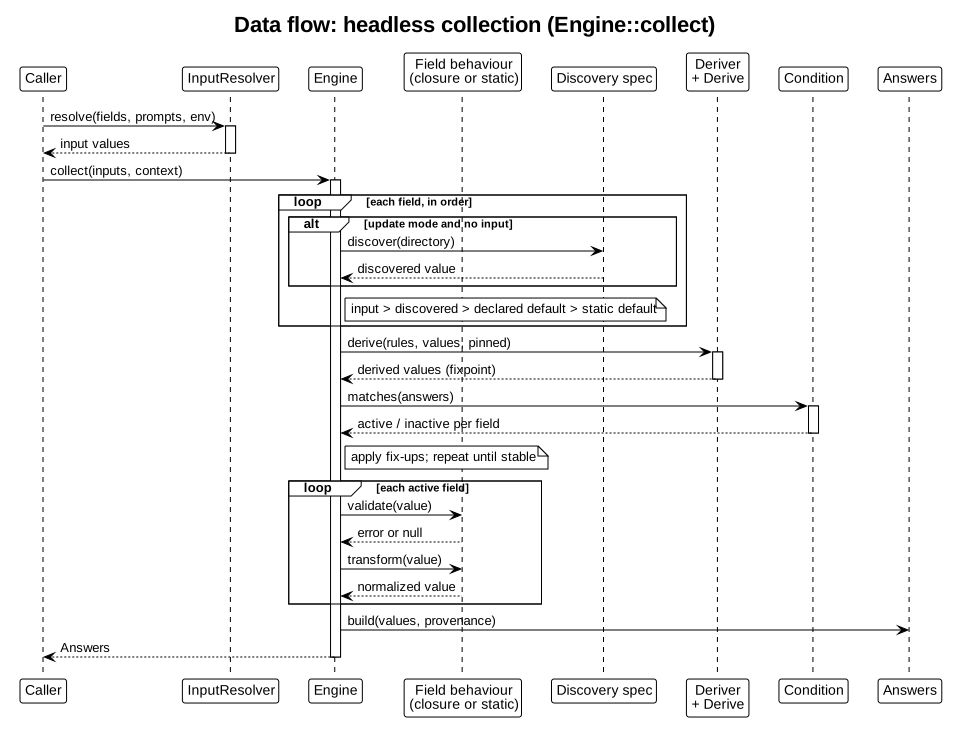
Walking the sequence:
- Resolve each field's starting value, in priority order: an explicit input (from
--promptsor the environment, viaInputResolver) beats a discovered value (in update mode), which beats a handler's dynamicdefault(), which beats the static default in the config. - Settle the derived and conditional fields.
Deriverrecomputesderivevalues (withTransform) until they stop changing,ConditionEvaluatordecides which fields are active from theirwhenrules, and fix-ups reconcile dependents - repeated until the whole set is stable. - Validate and transform every active field through its handler.
- Emit
Answers- the values plus their provenance (default, discovered, edited).
The same lifecycle runs whether the caller is a human at the TUI or a script passing JSON, which is why the engine is testable without a terminal.
Step 4 - let a person answer (optional)
For interactive use, PanelController::run() seeds itself with the engine's
resolved answers and drives a panel TUI until the user is done:
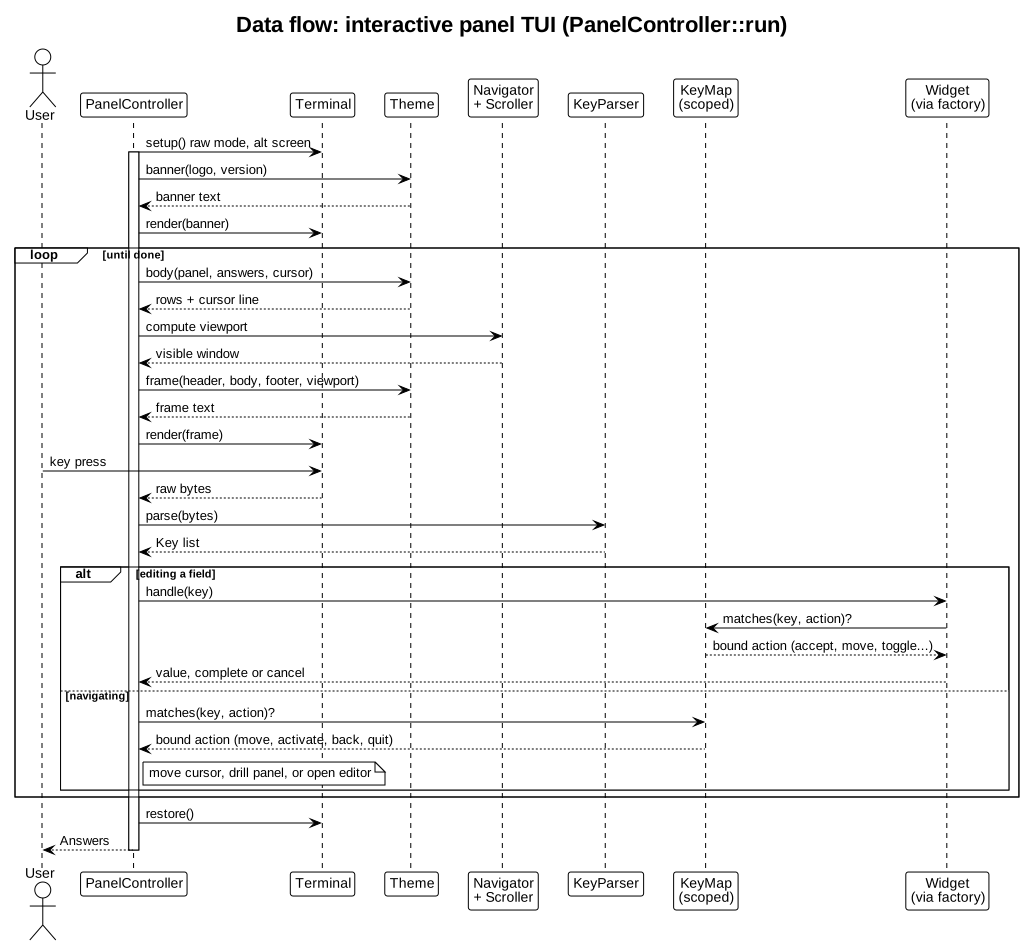
The theme instance comes from ThemeManager - a registry keyed by name ("dark",
"light", or a registered custom class) that also detects the terminal's colour and
Unicode capabilities and, when no theme is named, picks light or dark from the
terminal background (an OSC 11 query answered by the Terminal, then COLORFGBG,
then a dark default). Each turn the controller asks the Theme to compose a
frame (the theme owns colours, glyphs and layout), computes the visible window
with the Navigator and Scroller, and renders it to the Terminal. A key press
is parsed by KeyParser into a Key, which a KeyMap resolves to a semantic
action (move, accept, toggle, quit...) rather than a fixed key - the bindings
behind each action are configurable per widget type, ship a vim preset alongside
the default, and are validated when the form is built. Armed with the action, the
controller either moves the cursor / drills into a sub-panel, or opens a widget to
edit a field - the widget consults the same key map, and both render themselves
through the theme, under a theme-composed underlined label header. Editing writes
the new value back and marks it "edited". When the user finishes, it returns the
same Answers object the headless path produces.
Step 5 - apply the answers (the consumer's job)
Collecting produces answers; acting on them - writing files, renaming directories
- is the consumer's job, never the engine's. A consumer that processes answers
defines its own processor contract with a
process()hook, resolves each processor class by field id through theHandlerRegistry, and orders the work by the per-fieldweightmetadata (ties in reverse declaration order). One class per field can carry both itsprocess()and the reusable staticvalidate()/transform()the engine discovers. This is exactly what the Vortex CLI does with itsProcessorInterfaceandProcessor.